Built for players who want precision — not bloat
R6 No Recoil does one thing exceptionally well: smooth, responsive recoil control for Rainbow Six Siege. No installer, no heavyweight software, no unnecessary features eating your CPU.
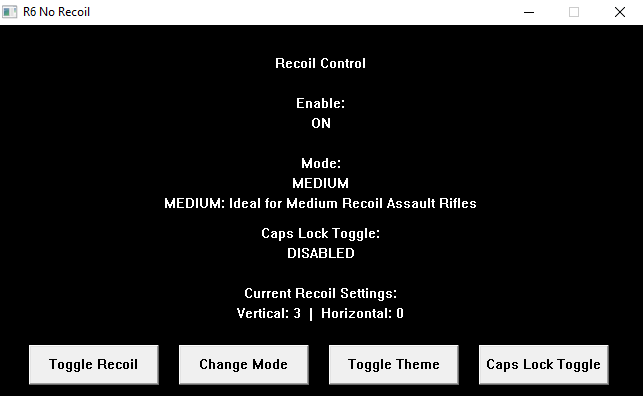
Clean interface. Instant control.
- Minimal CPU footprint — no impact on in-game performance
- No installation needed: extract the zip, run the .exe
- Works seamlessly on Windows 10 & 11
- Per-operator and per-weapon configuration support
- Full Xbox & PlayStation controller support (PlayStation requires DS4Windows)
-
Custom keybinds, themes, and config via a simple
Config.toml
Everything you need. Nothing you don't.
Lightning Fast Response
Optimised for minimal CPU usage and instant reaction with zero perceptible lag — even during intense firefights. 0% CPU usage and 1.4MB RAM usage.
Deep Configuration
Fine-tune recoil settings per operator and weapon. Custom keybinds, theme selection, and more — all from a single config file.
Mouse & Controller
Works flawlessly with both mouse and controller setups. Full Xbox support; PlayStation via DS4Windows. Just enable with a click of the Enable Controller button.
No Installation
Download, extract, and run. No bloated installers and no dependencies. It just works.
Up and running in minutes
Become a Ko-fi supporter to unlock access to the private Discord server
Join the Discord using the invite sent after supporting or by linking your Ko-Fi and Discord accounts in your Ko-fi settings
Download the tool from the supporter or download channel in the Discord server
Extract the zip and run the .exe — no installation required
Choose between Attackers or Defenders and then pick your operator and weapon
Test your Vertical and Horizontal preset in shooting range, and when happy click Save Preset to save the preset to the selected gun.
Use CapsLock (default) to toggle on/off mid-game — fully rebindable and only when enabled (Click Toggle Key to enable)
Enable Controller support by simply pressing Enable Controller and then checking the status and multiplier on the status bar
Enable Randomised Recoil for an extra layer of unpredictability and for more natural recoil patterns.
Tweak themes, controller settings, and keybinds in Config.toml